

Smart Office: Height-Adjustable Desk with Power Outlets

You probably know the situation. Laptop, monitor, docking station, lamp, and chargers are on the desk. Underneath the desk, a power strip lies on the floor, along with power adapters, loose cables, and at least one plug that you can only reach by kneeling. As soon as the desk moves up, a small organizational problem quickly turns into a mechanical one.
This is precisely where a height-adjustable desk with power outlets becomes interesting. It's not just about comfort. It's about a workstation where power, movement, and cables are cleanly thought out together. When the power supply is directly on the desk, switching between sitting and standing becomes easier, the setup tidier, and handling technology in everyday life significantly more practical.
Why a desk with integrated power supply makes sense
The typical error doesn't just occur with cable clutter on the floor. It arises the moment a movable desk is treated like a static workstation. Monitor, laptop, dock, and chargers need power. But the desk moves up and down. This is where ergonomics and electrical safety meet.

In practice, I constantly see the same problem. The devices are placed sensibly on the surface, but the power distribution is located somewhere underneath or next to the desk. When switching from sitting to standing, this leads to tension on cables, dangling power adapters, hard-to-reach connectors, and tripping hazards in the legroom. This is not only untidy. It also increases the strain on cables, plugs, and connections.
An integrated power supply solves this design flaw much better than a loose power strip on the floor. The power input remains at a fixed point, and the consumers are closer to the connections they actually use. This shortens cable runs on the desk, and the movable section can be precisely guided and secured. Especially with electric height-adjustable desks, this is a practical advantage because less loose cable length needs to move with the desk.
The benefits are evident every day. Devices can be connected without reaching under the desk. Changing the working height becomes less about checking all cables and more about what it should be: an ergonomic adjustment in a few seconds.
What specifically improves in everyday life
- Less mechanical stress on cables. Shorter and neatly routed cables are less likely to be kinked or put under tension when moving up and down.
- Better accessibility. Frequently used connections are where they are needed, rather than in the legroom or behind the rolling cabinet.
- More safety in the movement area. Fewer loose strips and cables on the floor mean less tripping hazard and less contact with chair castors.
- Clearer system separation. Fixed consumers like monitors or docking stations can remain cleanly connected permanently, while mobile devices are charged directly at the desk.
I recommend such solutions particularly when the desk is adjusted daily. For a fixed desk, a good external power strip is often sufficient. For a sit-stand desk, the integrated version is significantly more worthwhile because it solves a problem that only arises through movement.
Who particularly benefits from this
This solution is particularly useful in three situations:
- Home office with limited space. Every item in the legroom is annoying, and every additional cable immediately stands out visually.
- Setups with multiple devices. Monitor, laptop, dock, chargers, and light sources require cable management that remains stable even when changing height.
- Workplaces with changing users. Those who share a desk benefit from clearly accessible connections and fixed, traceable cabling.
A height-adjustable desk with power outlets is therefore not just a comfort idea for brochures. It is a clean technical solution for a workstation that moves and needs to remain electrically safe.
The advantages of integrated power outlets in detail
The practical benefits often only become apparent after a few weeks of daily use. The desk moves up, two monitor cables remain still, the laptop continues to charge, and there's no loose strip hanging under the desk that moves or bumps with every adjustment. This is precisely where ergonomics and electrical safety meet.
Shorter routes for power and charging
Integrated power outlets move the connections to the workstation. This doesn't save seconds in a brochure, but many small, recurring actions in actual operation. Plugging in a power adapter, charging a smartphone, connecting a camera for a meeting. Everything happens within easy reach instead of under the desk edge or in the legroom.
For workplaces with a laptop, dock, and mobile devices, this is a clear advantage. If you also want to use USB at the desk, you should also look at the differences with a power strip with USB for the desk. Not every USB solution provides useful charging power, and not every port replaces a proper power adapter.
Less tension on cables when changing height
For a sit-stand desk, it's not just about where the power is, but also how the cables behave when moving. A well-placed power module shortens the free cable runs between the device and the connection. This results in fewer loops, less friction at the desk edge, and less tension on connectors.
This is an ergonomic advantage with a safety effect. If cables don't constantly need to be rerouted, untangled, or repositioned, the workstation remains calmer and more predictable. In practice, the risk of a partially loose plug overheating unnoticed or a cable being pinched in the movement area also decreases.
More usable space and a cleaner setup
On small desk surfaces, every fixed spot counts. An integrated module often replaces individual charging adapters that would otherwise lie loosely on the desk or hang down the side. This not only improves the appearance. It creates free space for input devices, documents, and clean monitor positions.
Under the desk, the solution also offers advantages. Where no additional strip lies loosely on the floor, vacuuming, rolling movement, and legroom become easier. Especially in home office setups with limited space, this is more than a question of comfort.
Cleaner built, easier to control
I always evaluate such desks according to a simple principle: electricity at the workplace should remain traceable. Integrated power outlets help with this because the number of improvised interim solutions decreases. Fewer adapters, fewer multi-plugs, fewer places where a connection can come loose.
However, the advantage only arises with sensible implementation. A power outlet module in the wrong position is of little use if the supply line hangs loosely or the device connections are put under tension when moving up. Good solutions lead power where it is needed and keep the moving cable runs short.
Practical for mixed setups
Integrated power outlets are particularly useful at workstations with both fixed and temporary consumers. Monitor, dock, or desk lamp remain permanently connected. Laptop power adapter, charger, or ring light are added as needed. This separation makes the setup clearer and reduces unnecessary re-plugging.
Some models combine power outlets with USB or inductive charging surfaces. This can be useful if the additional functions are cleanly integrated into the power concept. However, it does not replace checking the actual basis: number of connections, position, fastening, and safe cable routing.
Where the advantage is smaller
Not every user needs this equipment. Anyone who rarely adjusts the desk, only operates a laptop, and already uses a properly secured external strip often gains little. In such cases, a good retrofit solution is often more economically sensible.
The added value arises primarily where there is movement in the system. That is, precisely with desks that move up and down daily and need to supply multiple devices. In this area of application, an integrated power supply improves not only comfort but also the electrical order of the entire workstation.
Technical aspects you need to know
You don't have to be an electrician to assess a height-adjustable desk with power outlets. However, you should understand which technical details are truly relevant in everyday life. The decisive factor is not having as many features as possible, but the right combination of connections, fastening, and cable routing.

Which connections are really useful
Not every workstation needs the same ports. For many setups, classic power outlets plus USB are the most practical combination. In the German market, USB-A/USB-C combinations are particularly relevant. Equally important are cable lengths of around 2.5 m, as they allow the power module to be flexibly positioned above or below the desktop. For retrofit modules, mounting with set screws is also useful, as it can accommodate different desktop thicknesses and creates a firm fit that reduces vibrations and contact problems during adjustment (technical data on desk power outlets).
So the basic question is not just: Which connections are available? The more important question is: Where are they located, and do they remain stable when adjusted?
Overview of common connection types at the desk
| Connection type | Typical use | Advantage |
|---|---|---|
| Schuko socket | Monitor, docking station, power supply, lamp | Supplies classic work devices directly |
| USB-A | Mouse, headset, smartphone, accessories | Practical for older or common charging cables |
| USB-C | Smartphone, tablet, modern peripherals | One connection for many current devices |
| Wireless charging | Smartphone on the desk surface | No separate charging cable needed on the desk |
If you choose a retrofit solution, practical tips for a power strip with USB at the desk will also help you, as they clarify when USB directly at the workstation is more sensible than a separate charger.
How to recognize a usable module
When choosing a power module, pay attention to these points:
- Fixed mounting. Clamp or screw solutions must sit without play.
- Suitable position. Side-mounted modules are quickly accessible. Under-desk solutions often appear calmer.
- Clean supply line. The connection cable must not be under tension when changing height.
- Sensible port selection. Many rarely used ports are less useful than a few, easily accessible connections.
If the module wobbles minimally when adjusted, the mounting is not good enough. Small movements become contact and wear problems in everyday use.
Protection and workmanship
For electrical components, clean execution is important. During the purchasing process, you should check whether the module is well-made, how the cable is routed out of the housing, and whether the fastening seems mechanically plausible. Even without deep technical knowledge, it is easy to see whether a solution is designed for a movable desk or would only work on a fixed piece of furniture.
A common mistake is confusing "electrically compatible" with "mechanically compatible." A module can have the necessary connections and still be unsuitable if the cable routing does not cope with height changes.
Safe cable management for height adjustment
Many guides talk about backs, posture, and desk height. This is correct, but incomplete. The critical point with a height-adjustable desk with power outlets is movement. A cable that is loose when sitting can suddenly be put under tension when standing. This is precisely where typical problems arise.

A frequently overlooked point is the safe and standard-compliant routing of power outlets on the desk. Much content focuses on ergonomics and stability and only marginally addresses cable management, strain relief, or bend protection. According to the NRW occupational safety advisory note on risk assessment, there is no known regulation requiring all desks to be height-adjustable. The specific design is subject to the employer's risk assessment. This is precisely why the safe implementation of power routing is so important.
What goes wrong with movement
The risks are often trivial and therefore insidious:
- Tension on plug connections. Plugs become loose or are crooked.
- Kinks in cables. Especially where cables are tightly routed around desk legs.
- Getting caught on frame parts. Moving frames create changing contact points.
- Loose power adapters on the floor. When moving up, they remain on the floor while the desk continues to move.
The problem is not just untidiness. It's wear and tear. Cables age faster if they are constantly bent or strained at the same spot.
How to plan the routing correctly
Safe cable management begins under the desktop. Power adapters and power strips should ideally not be on the floor. Instead, they belong in a cable tray or on a fixed holder under the desk.
Particularly useful are:
- Cable tray. It holds power adapters, power strips, and excess lengths.
- Flexible vertical routing. The supply cable to the wall needs room to move.
- Strain relief. Cables must not be stressed directly at the plug.
- Kink protection at tight spots. Especially at outlets and edges.
For practical planning, a neatly set up cable management at the workplace helps, as it makes this connection between order and operational safety visible.
The best cable management is the one you don't notice when adjusting. If you have to look every time, the solution is not yet right.
A simple practical test
Before you consider a setup complete, test it in operation:
- Lower the desk all the way.
- Check each cable for slack and contact points.
- Raise the desk to the highest position.
- Observe whether any tension, loops, or snags occur.
This test seems simple. But it quickly shows whether a neat-looking setup is also suitable for movement.
Assembly and installation of power strips
There are two fundamentally different approaches to assembly. You buy a desk with a factory-integrated power solution. Or you retrofit a power strip yourself. Both can work. The deciding factor is how well the solution fits the frame and your array of devices.
Factory-integrated or retrofitted
An integrated system often appears tidier. Connections, cable routing, and positioning are already considered by the manufacturer. This reduces assembly effort and minimizes typical weak points such as loose modules or too short cable runs.
Retrofitting offers more flexibility. You can specifically choose connections, position, and design. This is particularly worthwhile if you continue to use existing furniture or have a special setup. However, you then need to ensure that the power strip is mechanically sound and does not interfere with the table's movement.
Direct Comparison
| Option | Advantage | Disadvantage |
|---|---|---|
| Integrated solution | Clean aesthetics, less coordination effort | Less flexible in terms of position and retrofitting |
| Retrofit power strip with clamp or screw | Freely positionable, highly adaptable | Installation quality heavily depends on the design |
| Fixed built-in solution in the tabletop | Very clean look | Extensive modification to the tabletop |
What to consider during installation
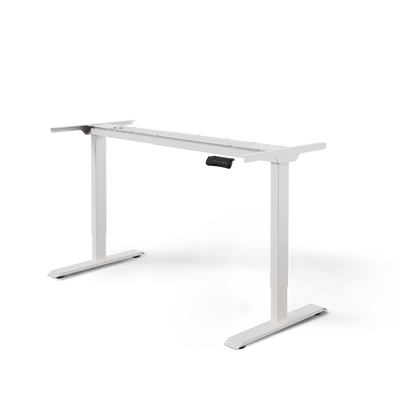
When integrating power outlets, it's not just about the power module. The table must also be able to move the additional equipment stably. For height-adjustable tables, typically 1 or 2 motors are used for rectangular tables and 3 motors for corner solutions, depending on the design. Synchronized drives distribute the load more evenly and reduce tilting forces during adjustment (technical classification of motors and drives).
This is practically relevant if you have multiple monitors, a docking station, mounts, and a power outlet solution on your desk. The more technology attached to the table, the less tolerant the system becomes to poor weight distribution.
What works well in practice
- Clamp mounting is suitable if you don't want to drill and the table edge is freely accessible.
- Screw mounting is often more stable, especially under the tabletop.
- Recessed mounting in the tabletop only works if you know the exact position, cable routing, and future use.
If you're planning a retrofit solution, a suitable holder for power strips under the desk is often more practical than a loose power strip in some corner under the tabletop. The holder transforms an electrical component into a resilient part of the moving setup.
The right desk for your personal setup
Not everyone needs the same desk. The right height-adjustable desk with power outlets depends on how much technology you use, how often you plug and unplug devices, and how much your workspace changes in everyday life.

Height-adjustable desks cover almost all body heights with typical adjustment ranges from 65 to 130 cm. Home office frames usually carry 70 to 100 kg, while high-performance solutions for more demanding setups can handle 120 kg and more (market overview of adjustment range and load capacity). This range is more important for selection than any design feature.
Home Office with Compact Technology
In a home office, efficiency in a limited space is often key. You don't need a maximally complex desk, but one that can power your laptop, monitor, charger, and light without adding to the clutter. Here, easily accessible USB ports and discreet cable management are usually more important than a large number of traditional outlets.
Pay particular attention to:
- tidy cable routing
- easily accessible ports
- sufficient load capacity for monitor plus accessories
Creator and Tech Setups
As soon as cameras, microphones, audio interfaces, docking stations, or multiple displays are added, the power supply quickly becomes central. Then, "somehow connected" is no longer sufficient. The desk should mechanically support the additional weight cleanly and offer enough space for fixed cable routing.
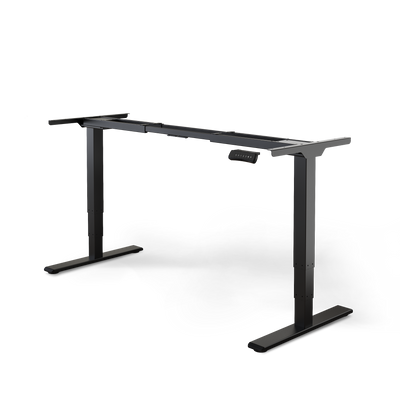
Here, a more stable solution is often advisable. If you are planning within the Deskspace range, a model like the DESKSPACE TITAN can be relevant for such tech-heavy setups, as it is designed for heavy workstations. However, the name is not the deciding factor, but whether the frame, load capacity, connection points, and accessories logically fit together.
Office and Team Workplaces
In the office, repeatability is key. The desk should be usable by different people and allow for a setup that remains tidy even after many weeks of work. Power outlets directly at the workstation are especially helpful where devices are regularly changed or added.
In multi-user environments, clear cable management saves less time during setup, but primarily time during daily use.
If you are planning for multiple people, a universal adjustment range is more important than individual custom solutions. It is equally important that accessories such as monitor arms, cable trays, and power modules work together and do not obstruct each other.
Frequently Asked Questions (FAQ)
Is a height-adjustable desk with power outlets only useful for large setups?
No. Small workspaces, in particular, often benefit greatly. When space is limited, loose power strips and power adapters on the floor are much more disruptive than in a large office. An integrated power supply quickly creates order there.
Is a normal power strip under the table sufficient?
It can be sufficient if it is securely mounted and the power cord is neatly routed. Loose power strips on the floor are a weaker solution for movable tables. The problem is usually not the power strip itself, but its position and the lack of strain relief.
What's better, USB directly on the desk or a separate charger?
That depends on your daily routine. If you frequently connect smartphones, headsets, or small devices, USB ports directly on the desk are convenient. If you mostly use fixed power adapters for your laptop and monitor, traditional power outlets might suffice.
Can I retrofit any power strip to any desk?
No. The crucial factors are tabletop thickness, frame design, range of motion, and space under the tabletop. A power strip that works well on a static desk might be mechanically unsuitable for a height-adjustable model.
What should I consider when positioning the power outlets?
Choose the position according to your usage profile. Frequently used connections should be easily accessible. Permanently plugged-in power adapters, however, can be further back or under the tabletop. It's important that you don't hit the module with your knees or cables when adjusting the table.
Are integrated power outlets automatically safer?
Not automatically. The solution only becomes safe through proper installation, clean cable routing, and sufficient movement allowance. A poorly installed integrated power strip can be more problematic than a neatly secured retrofit solution.
Do I need something different for a corner desk than for a straight desk?
Often, yes. Corner solutions usually carry more technology and have more complex cable routes. This increases the demands on the drive, load distribution, and cable management. The power solution must therefore match the type of furniture, not just the number of devices.
Is a complete system worthwhile, or should I combine components myself?
A complete system is often simpler if you want to invest little time in coordination and assembly. Combining components yourself is worthwhile if you have clear requirements and know exactly where each connection should be. However, you then need to consider the mechanical aspects, not just the electrical ones.
If you are planning a new workstation or want to cleanly retrofit an existing setup, you will find electrically height-adjustable desks, frames, and suitable accessories for cable management and workstation organization at DESKSPACE. The combination of desk, cable management, and accessories is particularly useful so that the workstation not only looks ergonomic but also functions technically flawlessly in everyday use.


