

The Complete Guide to Sit-Stand Desks

A sit-stand desk is more than an adjustable piece of furniture. It's your answer to the health problems caused by long and rigid sitting during the workday. Its crucial advantage lies in bringing the necessary movement back to your workstation.
What a sit-stand desk really is

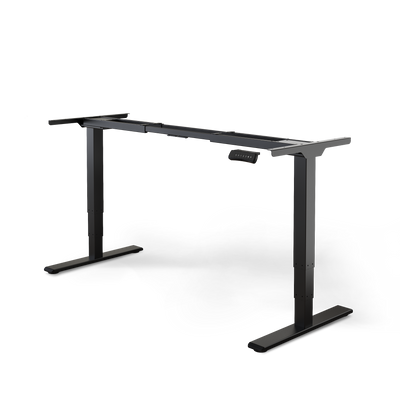
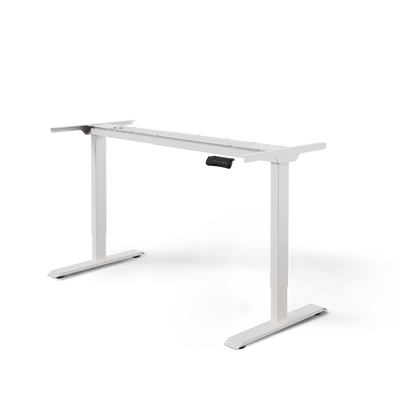
Consider a sit-stand desk an active tool for your health and concentration. Unlike a normal fixed-height desk, it has a frame that can be electrically adjusted at the touch of a button.
This function breaks the monotony of static work. Staying in the same position for hours often leads to tension, fatigue, and poor circulation. The dynamic change between sitting and standing solves this problem.
The core problem of rigid working postures
The human body is made for movement. It is not designed to remain in a single position for eight hours straight. Prolonged sitting often leads to typical problems that affect your performance and well-being.
These include:
- Back and neck pain due to one-sided strain on the spine and shortened muscles.
- Lack of concentration and fatigue because circulation slows down and less oxygen reaches the brain.
- Poor posture that persists even after work.
- A slowed metabolism, which can contribute to long-term health risks.
A height-adjustable desk is the pragmatic solution to these problems. It doesn't force you to stand all day. It allows you a healthy balance.
The solution lies in alternation
The strength of a sit-stand desk unfolds through regular changes in posture. In Germany, many office workers struggle with the consequences of prolonged sitting. One in five people sits for over nine hours a day. A study proves the benefits of height-adjustable desks. After just three months, participants sat 17 percent less. Additionally, 47 percent of users reported significant relief from discomfort in their upper back, neck, and shoulders. You can find more about the study results directly on steelcase.com.
A sit-stand desk gives you back control over your posture. It makes movement a natural part of your workday.
This simple change activates your muscles, boosts circulation, and keeps you mentally alert. At the end of the day, you feel more energized and less tense. This understanding forms the basis for the deeper health benefits.
The scientifically proven health benefits

A sit-stand desk offers more than just a change from rigid working posture. Its positive effects are physiologically measurable and supported by studies. They affect your metabolism, the health of your spine, and your ability to concentrate.
Regular alternation between sitting and standing is a powerful impulse for your body. It breaks the metabolic stagnation that occurs with hours of sitting. Every change in posture activates the large muscle groups in your legs and torso.
This muscle activation consumes energy and boosts your metabolism. The result is an increased calorie expenditure throughout the day. Standing alone does not replace a workout. However, it helps reduce the negative metabolic consequences of prolonged sitting.
Activation of the cardiovascular system
When you stand up from sitting, your heart works harder. It pumps blood upwards against gravity. This process is a gentle workout for your cardiovascular system.
Improved blood circulation better supplies your body and brain with oxygen and nutrients. In the long term, this can reduce the risk of certain cardiovascular diseases associated with an inactive lifestyle. For more comprehensive information on your health, visit the Health Portal.
The crucial point is not standing for hours. It is the regular change. This interrupts harmful phases of inactivity and keeps your body dynamic.
The change in posture also stimulates venous return from the legs. This activates the calf muscle pump and prevents heavy legs or varicose veins.
Biomechanical relief for back and neck
One of the most direct effects concerns your spine. Prolonged sitting creates constant pressure on the intervertebral discs in the lower back. This is especially true for a slumped posture.
As soon as you stand up, the load distribution changes. The natural S-shape of the spine is restored. The pressure on the intervertebral discs decreases. They can recover and be supplied with nutrient fluid.
This dynamic load change is key to preventing chronic back pain. It prevents one-sided overuse of muscles, ligaments, and joints.
The positive effects at a glance:
- Reduced pressure on the intervertebral discs in the lumbar region by up to 30% compared to sitting.
- Activation of the deep core muscles that stabilize your spine.
- Relief for the neck and shoulder muscles, as an upright posture is more natural when standing.
In our in-depth article, you can read more about whether working while standing is really as good as everyone says.
Increase in mental performance
The benefits of a sit-stand desk also affect your cognitive function and energy level. Improved blood flow supplies your brain with more oxygen. This demonstrably leads to better concentration and increased attention. Many users report a clearer head and less fatigue, especially during the afternoon slump.
Regular standing breaks through physical and mental monotony. This change can provide new impulses for thought, stimulate creativity, and help you stay focused on complex tasks.
Physical benefits are inextricably linked to mental freshness and productivity. With a sit-stand desk, you invest in your back health and your performance.
Choosing the right sit-stand desk for your needs

The decision for the right sit-stand desk can seem technical. This guide will lead you through the most important criteria. This way, you make the right choice and invest in a durable model.
The market for height-adjustable desks is growing rapidly. Consegic Business Intelligence estimates the global market at 3,992.41 million US dollars. By 2032, it is expected to grow to 6,108.25 million US dollars. In Germany, the Workplace Ordinance creates additional demand. This means a wide selection, but also the need to carefully examine quality and technology. You can find more market data on consegicbusinessintelligence.com.
Drive systems: The motors as the heart
The motors are the heart of an electrically height-adjustable desk. They determine the reliability, noise level, and comfort of the height adjustment. The number of motors is an important feature. Models with only one motor are often inexpensive but have disadvantages in terms of lifting speed and stability.
Systems with two motors are significantly better. They are installed in most high-quality desks. Each motor drives a desk leg. The result is a smooth, fast, and more stable height adjustment.
For large corner desks or models for heavy setups, three motors are used. They guarantee maximum stability and synchronized movement.
You can recognize a high-quality drive system by its smooth, quiet, and swift movement. The lifting speed, given in millimeters per second (mm/s), is a good indicator of quality.
Load capacity and stability: Crucial for your setup
The load capacity indicates how much weight the desk can lift and hold securely. This value is important if you use an extensive setup with multiple monitors and a heavy PC.
Pay attention to the dynamic load capacity. It describes how much weight the motors can move. If it's too low, the adjustment will be slow and the motors will wear out faster.
Stability is just as important. A good desk won't wobble even in the highest position. This is ensured by a massive steel construction, wide feet, and precisely manufactured lifting columns.
These factors influence stability:
- Material quality: Thick-walled steel in the frame prevents warping.
- Construction: Multi-stage lifting columns with minimal play ensure a firm stand.
- Weight of the frame: A higher intrinsic weight contributes to stability.
For a direct comparison, see our guide to the best height-adjustable desks.
Control and additional features: Comfort in everyday life
Modern sit-stand desks offer more than just height adjustment. Intelligent controls improve daily use and increase safety.
A memory function is practically indispensable. You save your ideal sitting and standing heights and recall them at the touch of a button. This eliminates the need for readjustment and encourages regular use.
Another safety feature is anti-collision protection. Sensors detect obstacles during movement and stop the movement immediately. This protects your furniture and the motors.
Material and workmanship: Quality you can feel
The quality of the tabletop and frame determines the appearance and durability of your desk. A robust, scratch-resistant, and easy-to-clean coating on the tabletop is essential.
For the frame, a high-quality powder coating protects the steel from scratches and corrosion. Pay attention to details such as clean welds and the precise fit of the components. Well-thought-out cable management ensures a tidy workspace.
Comparison of technical features for sit-stand desks
This table summarizes the most important technical features. It helps you compare specifications and find the right model.
| Feature | Entry-level models (e.g., 1 motor) | Standard models (e.g., DESKSPACE PRO, 2 motors) | High-end models (e.g., DESKSPACE TITAN, 3 motors) |
|---|---|---|---|
| Drive | 1 motor, often slow & noisy | 2 motors, synchronized, quiet & fast | 2 or 3 motors for maximum performance |
| Load capacity (dynamic) | Approx. 60–80 kg | Approx. 100–160 kg | Over 160 kg |
| Lifting speed | Slow (< 30 mm/s) | Fast (approx. 35–40 mm/s) | Very fast (> 40 mm/s) |
| Stability | Moderate, may wobble at full height | Very good due to solid steel & precise columns | Maximum, even with heavy loads & in corners |
| Memory function | Mostly absent or 2 slots | Standard 3–4 memory slots | Extensive memory functions |
| Anti-collision | Often absent | Standard with adjustable sensitivity | Highly developed, multi-stage sensors |
| Suitable for | Light setups, occasional use | Standard home office, professional workstations | Large setups, L-shaped desks, heavy equipment |
There is a suitable model for every requirement. Entry-level desks are sufficient for minimalist setups. Standard and high-end models offer the performance and comfort for a professional workstation.
Setting up and using your desk perfectly ergonomically
A height-adjustable desk is a tool for your health. Its potential only unfolds with correct adjustment and active use. Correct adjustment is the foundation for dynamic, healthy work.

Perfect ergonomics are achieved through the interaction of desk height, chair, and monitor. Incorrect settings can nullify positive effects or cause new tension. This guide is your roadmap for a healthy workday.
Finding the right height for sitting
The first step starts with your office chair. Sit so that your feet are flat on the floor. Your knees should form an angle of about 90 degrees. This sitting position is your starting point.
Now the desk comes into play. Lower it until your forearms rest loosely on the tabletop. Your upper arms hang relaxed at your sides. Your elbows should have an angle of 90 to 100 degrees. Your shoulders remain relaxed and are not shrugged.
As a rule of thumb: your arms form a straight line from your elbows to your wrists. This avoids strain on shoulders, neck, and wrists.
Next, position your monitor. The top edge of the screen should be at your eye level or just below. Your gaze should be slightly downward. This is the most relaxed posture for your neck.
Setting the optimal standing height
To adjust for standing, raise the desk. The basic rule for arm posture is the same as when sitting. Stand upright with a straight back in front of the desk.
Your forearms should rest horizontally on the tabletop. Your elbows form a 90-degree angle. Do not lean on the table and do not shrug your shoulders.
The correct height is crucial. A desk that is too low forces you into a stooped posture. A desk that is too high leads to tension in the neck and shoulder area. Save your ideal sitting and standing heights in the table. This way, you can switch quickly at the touch of a button.
The ideal rhythm for switching
How often should you change positions? Regularity is crucial. It's not about standing for hours. Frequent, short changes are key.
A proven method is the 20-8-2 rule.
- 20 minutes sitting: Use this phase for focused tasks.
- 8 minutes standing: Switch to the standing position for phone calls or short meetings.
- 2 minutes moving: Use the break to stretch or walk a few steps.
This rhythm keeps your circulation and metabolism active. It prevents your body from falling into a rigid posture.
Ergonomic accessories for your workplace
A sit-stand desk is a good foundation. The right accessories perfect your workplace.
These additions are useful:
- Ergonomic floor mat: An anti-fatigue mat promotes micro-movements in your feet and legs. This improves circulation and relieves joints and back.
- Monitor mount: A flexible monitor arm allows precise adjustment of the height, tilt, and distance of your screen. This is important for the optimal line of sight when sitting and standing.
- Ergonomic mouse and keyboard: A vertical mouse or a split keyboard promotes a natural wrist posture. They prevent carpal tunnel syndrome and other overuse injuries.
If you combine correct adjustment, an active changing rhythm, and sensible accessories, your workplace becomes a health zone. In our guide, you can learn more about how to set up your desk correctly. This way, you use your sit-stand desk optimally for your health and productivity.
Which DESKSPACE model suits you best
Every workplace is unique. Your requirements for a sit-stand desk depend on your setup, your working style, and the available space. The DESKSPACE family offers the right solution for everyone.
From the all-rounder for the home office to the powerhouse for creators, there is a suitable model. All have high quality standards. This includes TÜV-certified safety, quiet and durable motors, and a reliable warranty.
Find out which model will be your partner for a healthier and more productive workday.
The DESKSPACE PRO for the home office
The DESKSPACE PRO is our proven classic and ideal for most home office workstations. It combines a powerful dual-motor drive with high stability and a load capacity of 120 kg. This is enough for a typical setup with two monitors and a laptop.
Its strength lies in its reliability and thoughtful design. The PRO is the right choice if you are looking for a functional and durable sit-stand desk.
It is the right choice if you:
- want to set up a classic, professional workstation.
- value a quiet and fast drive.
- need a stable frame for a standard setup with one or two monitors.
The DESKSPACE PRO PLUS for demanding setups
If your setup requires more power, the DESKSPACE PRO PLUS is the answer. It is based on the PRO but has been optimized for heavier loads. With a load capacity of 160 kg and a reinforced frame, it offers maximum stability.
The PRO PLUS is perfect for anyone working with heavy equipment or who values an absolutely stable desk. Nothing wobbles here, even in the highest position.
Choose the PRO PLUS if you:
- use multiple large monitors or heavy audio equipment.
- expect maximum stability without compromise.
- are looking for a future-proof solution for a growing arsenal of technology.
The DESKSPACE CORNER for optimal space utilization
Room corners often represent untapped potential. The DESKSPACE CORNER was developed to utilize this space. As an L-shaped sit-stand desk, it creates a large work surface and allows the separation of different work areas.
Powered by three synchronized motors, the CORNER moves its large tabletop smoothly and stably. It is the solution for multitaskers who need a lot of space for documents and multiple devices.
The DESKSPACE TITAN for maximum performance
The DESKSPACE TITAN is designed for the most demanding setups. It has an enormous load capacity of 200 kg. It is aimed at creators, video producers, engineers, and anyone who makes no compromises on stability and performance.
Its robust 3-column frame ensures unshakable stability. Even with several heavy monitors and professional studio equipment, the TITAN remains absolutely quiet.
The TITAN is more than a desk. It is the stable foundation for workstations where the highest precision and reliability are required.
Find the right DESKSPACE model for you
This table helps you find the ideal DESKSPACE model based on your requirements.
| Model | Ideal for | Load capacity | Special feature |
|---|---|---|---|
| DESKSPACE PRO | Home office power user | 120 kg | The reliable and powerful all-rounder. |
| DESKSPACE PRO PLUS | Demanding setups | 160 kg | Increased stability for heavier equipment. |
| DESKSPACE CORNER | Optimal space utilization | 150 kg | L-shape for maximum workspace. |
| DESKSPACE TITAN | Creators & Tech professionals | 200 kg | Maximum load capacity and unshakable stability. |
Each model is designed to offer you the best comfort and ergonomics. No matter which DESKSPACE you choose, you are investing in your health and productivity.
Frequently asked questions about the sit-stand desk
A height-adjustable desk is an important investment. It is normal for questions to arise before and after purchase. This section provides clear answers to the most common concerns.
We want to give you the confidence to make a good decision. From optimal usage time to technical details and care tips, you will find everything important here.
How long should I stand at a sit-stand desk per day?
There is no general rule. The perfect rhythm depends on your physical condition and your tasks. As a rule of thumb, a ratio of approximately 60% sitting to 40% standing has proven effective.
More important than the exact number of hours is regular changing. Try to change your posture at least once an hour. A good starting point is to stand for 15 to 20 minutes per hour.
Here are some practical approaches:
- The 20-8-2 rule: 20 minutes sitting, 8 minutes standing, and 2 minutes actively moving.
- Task-based switching: Use standing phases specifically for phone calls or video conferences.
- Hourly switching: Set a timer that reminds you to switch every 60 minutes.
Listen to your body. If standing feels uncomfortable, sit down again. Over time, you will find a routine that suits you.
Is a sit-stand desk really better for your back?
Yes. Using a sit-stand desk is demonstrably better for your back. The main reason is the avoidance of rigid, static stress. Prolonged sitting exerts constant pressure on the intervertebral discs, especially in the lumbar region.
Regular switching to the standing position breaks this one-sided stress. Your spine can adopt its natural S-shape. This reduces pressure on the intervertebral discs and relieves the surrounding muscles.
Movement also activates the deep core muscles, which are crucial for spinal stability. This acts like gentle, continuous training and prevents long-term back pain.
It is crucial that the desk is ergonomically adjusted correctly for both sitting and standing. Incorrect height can negate the benefits.
How much weight can an electric desk hold?
The load capacity is a crucial quality feature and varies depending on the model. It depends on the strength of the motors and the stability of the frame.
One must distinguish between two values:
- Static load capacity: The maximum weight the desk can hold when stationary.
- Dynamic load capacity: The weight that the motors can move safely and smoothly. This is the more important value.
Here is an overview of load capacities:
| Model type | Typical dynamic load capacity | Suitable for |
|---|---|---|
| Entry-level models (1 motor) | approx. 60–80 kg | Minimalist setups with laptop and one monitor. |
| Standard models (2 motors) | approx. 100–160 kg | Professional workstations with 2-3 monitors. |
| High-end models (3 motors) | Over 160 kg | Very large setups, L-shaped tables or heavy equipment. |
Before buying, consider what you want to place on your desk. Plan a buffer of 20–30% so that the motors do not operate at their load limit.
How loud is a sit-stand desk during adjustment?
The noise level is an often underestimated factor. High-quality models operate quietly to avoid disturbing you.
The noise level is measured in decibels (dB). A good electric sit-stand desk should not exceed 50 dB during height adjustment. This corresponds to the volume of a quiet refrigerator.
Cheaper models can be significantly louder. Pay attention to the manufacturer's specifications. Quiet motors are a sign of high-quality workmanship.
How do I care for and maintain my height-adjustable desk?
Caring for a height-adjustable desk is straightforward. With a few simple steps, you ensure a long service life.
Regular cleaning:
- Tabletop: Wipe the surface regularly with a soft, slightly damp cloth. For stubborn stains, you can use a mild cleaner. Avoid harsh or abrasive agents.
- Frame: The powder-coated frame can also be cleaned with a damp cloth. Remove dust with a dry microfiber cloth.
Technical maintenance:
Special technical maintenance is not necessary for high-quality tables. The motors and electronics are encapsulated and maintenance-free.
Pay attention to these points:
- Check screws: Check every few months to ensure all screws are tight.
- Cable management: Make sure no cables are pinched or under tension.
- Perform reset: If the desk is no longer moving correctly, a simple reset often helps. You can find instructions in the manual.
With these measures, your sit-stand desk will remain a reliable partner for a healthy workday.
Ready to improve your workspace? Discover the perfect, TÜV-certified sit-stand desk at DESKSPACE that precisely matches your needs. Find your model now and invest in your health and productivity. Learn more at https://deskspace.de.


